
Volunteer Sign-up Instructions
1. Log in to the website. Login is found in the upper right hand corner of the screen.
If you can’t remember your password, click "Forgot your password" to reset your password.
2. Click the Events & Signups tab from the main navigation menu

3. Click the green JOB SIGNUP tab

4. Click "Sign up For Jobs"

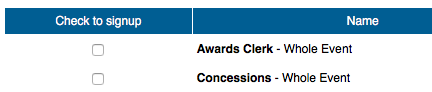
5. Select the box under "Check to signup" on the left for the shift you would like to volunteer for (note one parent may sign up both parents for jobs -- scroll down and you’ll see the other parent listed).
6. Click Save Assignments.
7. Click Back to Signup Calendar.
8. Repeat for any open events that you'd like to volunteer for.
Questions? Issues? Please use the Contact us Tab in the navigation menu.
Text Area
Simple formatted text

